robots.txt vs
sitemap.xml vs
llms.txt
What's the Difference?
Three files. Three jobs. Zero jargon. Here's what they actually do — and why your site needs all of them.
Tells crawlers what they're NOT allowed to visit. The bouncer at the door.
Shows search engines a map of everything they should index. The helpful guide.
Gives AI models a clean summary of your site. The welcome brochure for AI visitors.
Your website talks to bots. These files control what it says.
If you've been managing a website for a while, you've probably heard of robots.txt and sitemap.xml. They've been SEO staples for years. But lately, a third file has quietly started appearing in conversations — llms.txt.
So what's going on? Do you need all three? Are they competing with each other? And what on earth does "llms" even stand for?
When your site goes live, it's not just humans visiting it. Bots, crawlers, and AI systems are constantly scanning the web — indexing content, training models, and pulling data. These three files are essentially instructions you leave on your site to communicate with those automated systems. Each one talks to a different audience and serves a different purpose.
? Key Insight
robots.txt= "Here's what you're NOT allowed to crawl."
sitemap.xml= "Here's a map of everything you CAN index."
llms.txt= "Here's a summary written specifically for AI to understand my site."
robots.txt is the oldest of the three. It's a plain-text file that lives at the root of your website — e.g., geotools.live/robots.txt — and tells web crawlers which pages or sections they should skip.
When a search engine bot like Googlebot lands on your site, one of the very first things it does is read robots.txt. If it sees a rule blocking a page, it won't crawl it. Simple as that.
A Real robots.txt Example
# All bots: block admin and private sections
User-agent: *
Disallow:   /admin/
Disallow:   /private/

# Googlebot gets full access everywhere else
User-agent: Googlebot
Allow:      /

# Point all crawlers to the sitemap
Sitemap:    https://geotools.live/sitemap.xml
In plain English: "All bots — stay out of /admin and /private. But Googlebot? You're welcome everywhere else."
✦ Good For
- Blocking duplicate content from being indexed
- Hiding staging environments or admin panels
- Controlling which bots access what
- Saving crawl budget on low-value pages
✦ Limitations
- It's a suggestion, not a law — bad bots ignore it
- Doesn't hide pages from search results — use
noindexfor that - One wrong line can accidentally block your whole site
- Can't reliably control AI training crawlers
While robots.txt is about what bots shouldn't touch, sitemap.xml is about what they should. It's a structured XML file that lists all your important URLs so search engines can find and index them efficiently.
You place it at geotools.live/sitemap.xml, then submit it to Google Search Console. Search engines use it as a roadmap to discover your content faster — especially helpful for new or large sites.
A Real sitemap.xml Example
<?xml version="1.0" encoding="UTF-8"?>
<urlset xmlns="http://www.sitemaps.org/schemas/sitemap/0.9">

  <url>
    <loc>https://geotools.live/</loc>
    <lastmod>2025-06-01</lastmod>
    <priority>1.0</priority>
  </url>

  <url>
    <loc>https://geotools.live/tools/coordinate-converter</loc>
    <lastmod>2025-05-20</lastmod>
    <priority>0.8</priority>
  </url>

</urlset>
✦ Good For
- Helping Google discover new or updated pages faster
- Signaling which pages are high-priority
- Large sites, new sites, or media-heavy content
- Providing freshness signals via last-modified dates
✦ Limitations
- Not a guarantee Google will actually index your pages
- Doesn't control AI crawlers or LLM systems
- Needs to stay updated as your site grows
- Works best only after submission to Search Console
Now for the newcomer on the block. llms.txt is a proposed standard (first put forward by Jeremy Howard in 2024) designed to help Large Language Models (LLMs) — like ChatGPT, Claude, Gemini, and Perplexity — understand your website better.
AI assistants are increasingly used to find information and answer questions. But they don't "crawl" the web the same way Google does. They need clean, concise, structured information to give accurate answers. That's exactly what llms.txt provides — a Markdown-formatted summary of your site at geotools.live/llms.txt.
A Real llms.txt Example
# GeoTools.live

> A free collection of online geospatial and mapping tools
> for developers, GIS professionals, and geography enthusiasts.

## Tools
- [Coordinate Converter](https://geotools.live/tools/coordinate-converter)
  Convert between GPS formats (decimal degrees, DMS, UTM...)
- [Distance Calculator](https://geotools.live/tools/distance-calculator)
  Calculate distances between two geographic points
- [GeoJSON Viewer](https://geotools.live/tools/geojson-viewer)
  Visualize GeoJSON data on an interactive map

## About
GeoTools.live is built for anyone who works with maps and
location data. All tools are free to use, no sign-up required.
✦ Good For
- Controlling how AI assistants describe your site
- Giving AI tools direct access to your key pages
- Establishing your brand voice in AI-generated answers
- Preparing for the AI-first search era ahead
✦ Limitations
- Still a proposed standard — not universally adopted yet
- Not all AI systems support it (adoption growing fast)
- Doesn't control indexing the way robots.txt does
- Currently manual to create and maintain
The Full Comparison
Here's everything you need to know about all three files in one place — great for sharing or bookmarking:
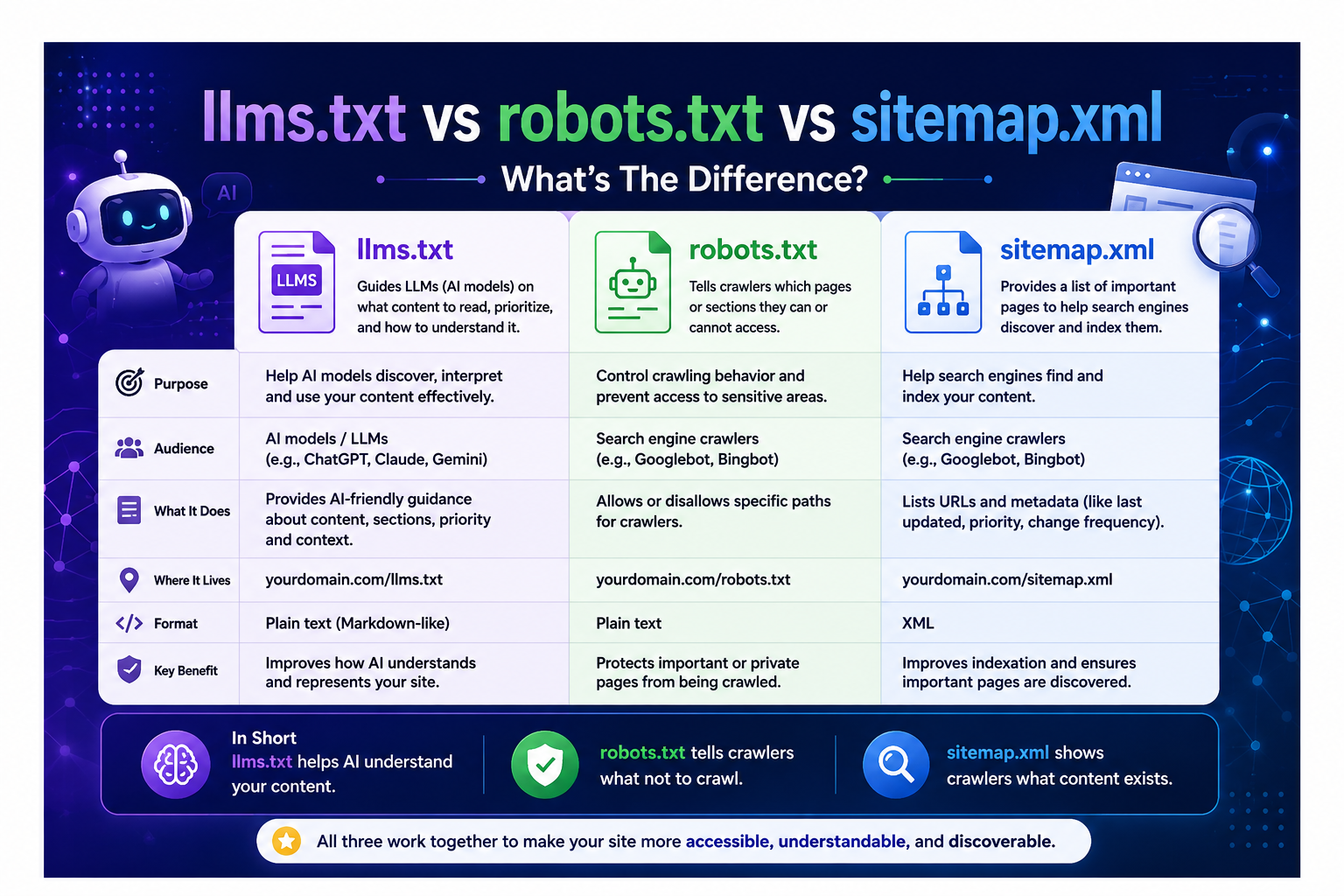
| Feature | robots.txt | sitemap.xml | llms.txt |
|---|---|---|---|
| Purpose | Block crawlers from pages | Help search engines discover pages | Help AI understand your site |
| Primary Audience | Search engine bots | Search engines (Google, Bing) | AI language models & assistants |
| File Format | Plain text | XML | Markdown |
| File Location | /robots.txt | /sitemap.xml | /llms.txt |
| How Old? | Since 1994 | Since 2005 | Since 2024 |
| Required? | Strongly recommended | Highly recommended | Emerging best practice |
| Controls Access? | ✓ Yes (crawl restriction) | ✗ No | ✗ No |
| Improves SEO? | ✓ Indirectly | ✓ Yes | ✓ For AI search |
| Legally Binding? | ✗ No | ✗ No | ✗ No |
Do You Need All Three?
Short answer: Yes — and here's why.
They serve three completely different functions. Having robots.txt doesn't make sitemap.xml unnecessary, and neither replaces what llms.txt does. Think of it like running a building:
- robots.txt is your security gate — it controls who gets in where.
- sitemap.xml is the directory board in the lobby — it shows visitors where everything is.
- llms.txt is your welcome brochure — written specifically for AI visitors who want the summary at a glance.
? Pro Tip — At GeoTools.live
robots.txtprevents crawlers from wasting time on internal tool pages that don't need indexing.
sitemap.xmlensures Google can quickly discover every geo tool, blog post, and utility page.
llms.txthelps AI assistants accurately describe what GeoTools.live offers when users ask "What's a good free coordinate converter online?"
Without all three working together, you're leaving gaps — in your SEO, your crawl efficiency, or your AI discoverability. And in 2025, all three channels matter.
Common Beginner Mistakes
Thinking robots.txt hides your pages from Google
It doesn't. It just stops Googlebot from reading them. If other sites link to a blocked page, Google can still list it in results — just without content. Use a noindex meta tag for actual hiding.
Not submitting your sitemap to Google Search Console
Creating the file is only half the job. Submit it at search.google.com/search-console so Google knows where to find it. Otherwise it could take weeks to be discovered on its own.
Accidentally blocking important pages in robots.txt
Many WordPress sites accidentally block their entire site with a single Disallow: / line. Always test your robots.txt using Google Search Console's URL Inspection Tool before going live.
Ignoring llms.txt because "AI isn't my audience"
AI assistants are increasingly mediating access to information. If Perplexity or ChatGPT describes your site inaccurately, you could be losing traffic to competitors who got their llms.txt right.
How to Create Each File
Creating robots.txt
yourdomain.com/robots.txt — not in a subfolder.
Creating sitemap.xml
Sitemap: https://yourdomain.com/sitemap.xml at the bottom of your robots.txt too.
Creating llms.txt
yourdomain.com/llms.txt. Check llmstxt.org for the official spec.
AI Crawlers Are the New SEO Frontier
We're entering a new phase of the web. Search is no longer just Google. Millions of people now use ChatGPT, Claude, Gemini, and Perplexity to find information — and those systems need to understand websites, not just index them.
llms.txt is the beginning of a real shift in how we think about online visibility. Just like robots.txt was essential in the early web era and sitemap.xml became critical during the content boom, llms.txt is shaping up to be the SEO file of the AI era.
Websites like GeoTools.live that adopt early — across all three files — will be far better positioned to be discovered, accurately described, and recommended by the AI systems that are increasingly driving web traffic.
? Pro TipStart with
robots.txtandsitemap.xmlif you haven't already, then addllms.txtas your third layer of discoverability. It takes less than 30 minutes to draft a solid one for most sites.
Quick Recap
Tells crawlers what they can't access. The control freak of the trio.
Shows crawlers a map of what they should index. The helpful guide.
Gives AI models a clean summary of your site. The new kid with massive potential.
All three serve different audiences, solve different problems, and work together — not against each other. You need all three to cover every channel in 2025 and beyond.
Useful Tools for Managing These Files
At GeoTools.live, we make technical tools simple and accessible. Here are the best free resources to manage all three files right now:
Working with maps and location data?
GeoTools.live offers free geospatial tools — coordinate converters, distance calculators, GeoJSON viewers, and more. No sign-up required.
Explore GeoTools.live →