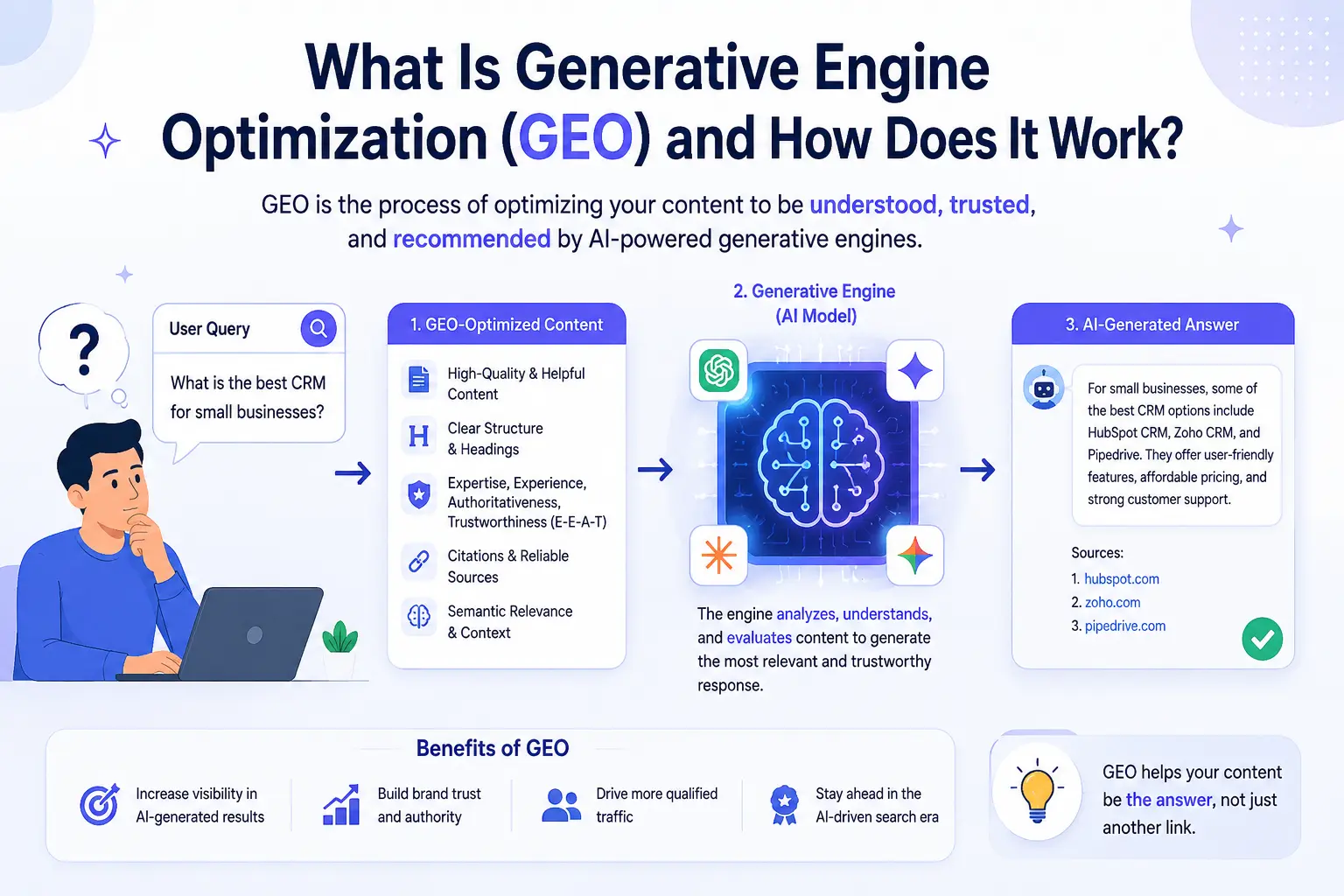
The Shift Away from Blue Links
Let me ask you something. When was the last time you typed a question into Google and actually clicked on one of the blue links? Probably less often than you used to.
More and more people are just asking ChatGPT, Perplexity, or Google's AI Overviews — and getting a direct answer, right there. No scrolling. No clicking. No ten tabs open at once.
That shift is real, and it's changing everything about how websites get found. If your SEO strategy was built entirely around ranking in Google's top ten, you're already playing a game that's quietly evolving around you. This is where Generative Engine Optimization — GEO — comes in.
So What Exactly Is Generative Engine Optimization?
Generative Engine Optimization, or GEO, is the practice of making your website content easy for AI systems to find, understand, and cite in their answers. Think about the difference between traditional SEO and GEO this way:
| Traditional SEO | GEO (Generative Engine Optimization) |
|---|---|
| Optimize pages so Google ranks them in a list. Users see that list, pick a link, and visit your site. | Optimize content so AI models — ChatGPT, Gemini, Perplexity, Claude — actually pull from your website when they generate answers. Your content becomes part of the answer itself. |
Instead of chasing a ranking position, you're chasing a citation. Instead of getting clicks from a results page, you're becoming the source that an AI trusts enough to quote. That's a fundamentally different goal, and it requires a different approach.
Key Insight: GEO shifts the goal from ranking in a list to being cited as a trusted source inside AI-generated answers. This changes how you write, structure, and present content.
Why Does GEO Matter Right Now?
AI search isn't coming. It's already here. Google AI Overviews now appear at the top of millions of search results. Perplexity has tens of millions of monthly users asking it direct questions. ChatGPT is being used as a search tool by millions of people who never even open a browser tab for research.
When those AI systems generate an answer, they're pulling from somewhere. Someone's website is being cited. Someone's content is being used as the source. The question is whether that someone is you — or your competitor.
Right now, most websites haven't made any adjustments for AI search at all. They're still doing the same on-page SEO they were doing in 2021, assuming Google is the only game in town. That gap is an opportunity. The businesses that understand GEO early are going to show up in AI answers while everyone else is still wondering why their traffic looks different.
How Does GEO Actually Work?
GEO isn't magic, and it isn't a single trick. It's a collection of practices that make your content more usable for AI systems. Here's how it breaks down.
1. Structure Your Content Like an Answer
AI models are, at their core, answer machines. When someone asks a question, the AI goes looking for content that's already shaped like a response. That means short, clear, direct answers work better than long paragraphs where the useful information is buried somewhere in the middle. FAQ pages, numbered lists, definition sections — these formats are naturally AI-friendly because they match the way AI delivers information.
A 2,000-word blog post with your key insight hidden in paragraph fourteen is hard for an AI to work with. A clean FAQ section that directly answers "What is X?" or "How does Y work?" is exactly what an AI needs to build a response.
Pro tip: You can build structured FAQ content in seconds using GeoTools' free FAQ Generator. Paste in your page URL, and it automatically generates clean, structured FAQ sections that are formatted specifically for AI citation and Google's People Also Ask results.
2. Use an llms.txt File
You probably know what robots.txt does. It tells search engine bots which pages to crawl and which to avoid. An llms.txt file works similarly, but it's designed specifically for AI models. It's a simple text file you place at your website's root (yoursite.com/llms.txt) that tells AI systems which pages on your site are most important, what your site is about, and where to find your best content.
Think of it as a cheat sheet for AI. Instead of an AI model guessing which of your pages matters, you're directly pointing it at your best work — your most authoritative pages, your most relevant content, your clearest answers. It's one of the most practical GEO steps you can take right now, and it takes about two minutes to set up with the right tool. GeoTools offers a free LLMs.txt Generator that scans your website, pulls your key pages, and builds the file for you — no technical knowledge required.
3. Be Specific and Authoritative
AI models don't just pull from random websites. They pull from sources that appear credible, specific, and clearly written. Vague content gets skipped. Generic statements get ignored. But a page that directly and clearly answers a specific question — with real information, not filler — is much more likely to be cited. This means writing content that actually takes a position, gives concrete details, and provides answers that someone couldn't easily find phrased that clearly anywhere else. The more specific and genuinely useful your content is, the more useful it becomes as a source for AI.
4. Optimize Your Technical Foundation
A page that loads slowly, has broken structure, or sends confusing signals to crawlers is harder for AI systems to process cleanly. Solid technical SEO is the floor that everything else stands on. GeoTools' free SEO Checker runs a full audit of your website — checking your on-page structure, meta tags, headings, technical signals, and more. It gives you a clear picture of what might be working against you before you build anything else on top of it.
5. Add Schema Markup
Schema markup is structured data you add to your pages that explicitly tells search engines and AI what type of content they're looking at. FAQ schema, Article schema, How-To schema — these formats signal clearly to AI systems: "This content is an answer to a question. Here's the question. Here's the answer." Pages with proper schema get cited in AI responses at noticeably higher rates. It's one of those things that takes some effort to set up but pays off significantly over time.
GEO vs SEO — What's the Real Difference?
A lot of people ask whether GEO replaces SEO, or whether you have to choose one or the other. The honest answer is that they work together, but they have different goals.
- Traditional SEO is about visibility in ranked lists — getting to position one, two, or three in Google search results so people click on your link. It's fundamentally about clicks.
- GEO is about getting cited in generated answers. It's about your content being the source an AI model trusts. It's fundamentally about authority.
In practice, many of the building blocks overlap. Good content structure helps both. Technical health helps both. Specific, well-written answers help both. But GEO requires you to think beyond "does this rank?" and start asking "would an AI choose to cite this?" That's a different question, and it often leads to different decisions about how you write, structure, and present your content.
What Kinds of Websites Benefit Most From GEO?
Honestly, most websites can benefit from GEO. But some see faster, more noticeable results:
- Service businesses — if you're a freelancer, agency, or local business, AI search is increasingly how potential clients find and evaluate their options. Being cited as a credible source in those answers can drive real leads.
- Content-heavy sites — blogs, resource hubs, and educational sites have lots of opportunities to create the kind of structured, answer-ready content that AI models prefer.
- E-commerce and SaaS — product descriptions, comparison pages, and FAQ sections are prime territory for AI citations when someone is researching before buying.
- Small businesses competing against large brands — this is where GEO gets interesting. Domain authority still matters for traditional SEO, where big brands often dominate. But AI models care more about answer clarity than about how long a domain has existed. A well-structured, specific answer from a smaller site can outperform a generic response from a big one.
Pro Tip: For small businesses, GEO can level the playing field. AI models prioritize clarity and specificity over domain age or brand size. A clear, direct answer from a small site often beats a generic answer from a large brand.
How to Start With GEO Today
You don't need to overhaul your whole website overnight. Start with the things that have the clearest impact:
- Run a site audit first. Before adding anything new, understand where you stand. Use the free SEO Checker to see what technical issues might be holding your site back.
- Generate your llms.txt file. It takes two minutes. Use GeoTools' free LLMs.txt Generator and get your site AI-readable today.
- Add structured FAQs to your key pages. Pick your most important pages — homepage, service pages, main blog posts — and add FAQ sections that directly answer common questions about your topic. The free FAQ Generator can build these for you from your existing content.
- Rewrite for clarity. Go back to your highest-traffic pages and ask yourself honestly: if someone asked the main question this page answers, is the answer clear, direct, and easy to find? If not, clean it up.
- Keep at it consistently. GEO is not a one-time fix. It's an ongoing approach to how you create and structure content. The sites that show up consistently in AI answers are the ones that make answer-readiness a habit.
The Bottom Line
Search is changing. That's not a hot take — it's just what's happening. People are increasingly getting their answers from AI, and the websites that are prepared for that are going to show up in those answers. The ones that aren't will see it reflected in their traffic over time.
GEO isn't about abandoning what's worked in SEO. It's about adding a new layer — making sure your content is ready for the way people are actually searching now, not just the way they searched five years ago.
The good news is that getting started doesn't require a big budget or a technical background. A few structured changes to your content, an llms.txt file, and a clean technical foundation can put you well ahead of most of your competitors who haven't thought about any of this yet. Start with the free tools. See how your site looks. Build from there.
Frequently Asked Questions About GEO
What does GEO stand for?
GEO stands for Generative Engine Optimization. It refers to the practice of optimizing website content to be cited and used by AI-powered search engines and language models like ChatGPT, Perplexity, and Google's AI Overviews.
Is GEO different from SEO?
Yes and no. GEO and SEO share many foundational principles — good content, clear structure, technical health — but they have different goals. SEO is about ranking in traditional search results. GEO is about being cited in AI-generated answers. The best strategy combines both.
Does GEO work for small websites?
Absolutely. In some ways GEO actually levels the playing field. AI models care more about content clarity than domain authority, which means a well-structured small site can get cited over a large brand if its answer is clearer and more specific.
What is an llms.txt file?
An llms.txt file is a simple text file placed at your website's root that helps AI models understand your site structure and find your most important content. It's one of the most practical first steps in a GEO strategy. You can generate one for free using GeoTools' LLMs.txt Generator.
How long does GEO take to show results?
It varies, but many of the foundational steps — like adding an llms.txt file or restructuring FAQ content — can improve AI visibility relatively quickly. Think of it as a progressive process. Each improvement makes your content more AI-ready, and the results build over time.
Do I need technical skills to do GEO?
Not for the core steps. Tools like GeoTools' FAQ Generator, LLMs.txt Generator, and SEO Checker handle the technical work for you. If you want to add schema markup, that takes a bit more effort — but even that has plenty of tutorials and generators available.
Ready to make your website AI-ready? Start with GeoTools' free toolkit — no signup required.
→ Generate your llms.txt file
→ Build structured FAQs for your pages
→ Run a free SEO audit